.png)
Designing With Purpose

Course Images and Video
Project Images Gallery
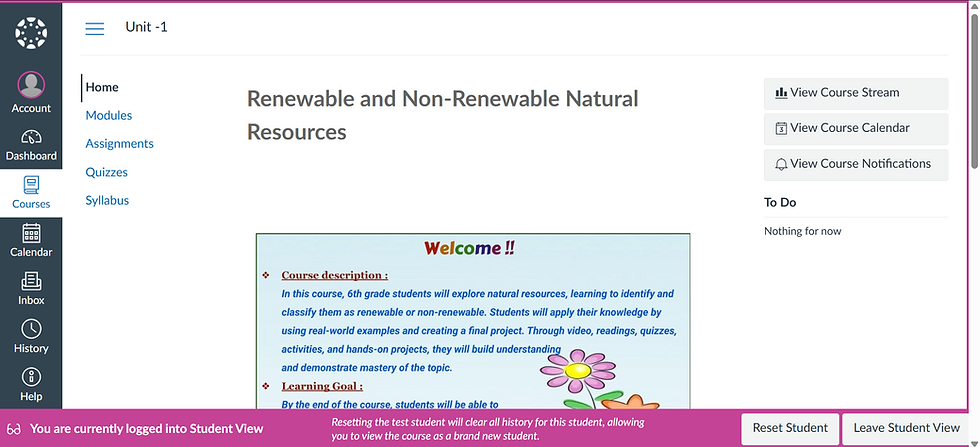


Video Walk Through

The Problem
A lack of structured guidance, and minimal opportunities for practice, feedback and interactive activities reduced student engagement and hindered mastery of key concepts.
Time constraints also prevented the adoption of new instructional tools.
As a result, only 16% of sixth-grade students met proficiency expectations.

The Solution
A structured, engaging eLearning experience was developed in Canvas LMS using interactive content, guided instruction, practice activities with timely feedback, peer collaboration, and formative assessments. By leveraging existing tools, the solution addressed project time constraints while increasing learner engagement and supporting mastery of key concepts.

The Outcome
The solution increased learner engagement by providing structured guidance, meaningful opportunities for practice and timely feedback, and addressing key learning gaps. It also offered an accessible, scalable approach that could be sustained using existing instructional tools.
Design Process
To create an effective learner-centered experience, I followed the ADDIE instructional design framework. Each phase informed the next, ensuring a systematic and evidence-based development process.
A
Understanding learner needs, prior knowledge, and learning challenges to inform effective instructional design decisions. Identify the learner & learning gap by conducting interviews & class room observations. Considered stakeholder's constraints like budgets and timelines. Developed empathy map & persona.
D
Defining strategy, aligning learning outcomes, ,assessments and instructions. Brainstorming creative solutions. Considering different learning theories and instructional design principles. Considering accessibility constraints. Collaborating with subject matter experts. Defining learning objectives and goals.
D
Translating design decisions into structured learning content and prototypes. Collabration with SME, and created lesson outline, story boarding and mock up slides.
I
Testing, validating, and refining the learning experience before full implementation. Conducted module implementation and pilot testing before full rollout. Feedback collected on learner reaction, learning outcomes, and performance impact.
E
Analyzing feedback and continuously improving the learning experience. Evaluated learner feedback (reaction) and assessed learning outcomes. Analyzed impact on performance and effectiveness. Developed a continuous improvement plan.Revisions to content clarity, instructional strategies, assessments, and pacing were made to ensure continuous improvement and stronger alignment with learner needs.
Deep Dive into the Design Process
Learner's Analysis

Research Methods

Classroom Observation & Contextual Research

Student & Teacher Interviews

Stakeholder & Subject Matter Expert (SME) Consultations

Learner Motivation and Learning Challenges
Key Findings From Research
Knowledge Gaps
Learners demonstrated varying levels of understanding of the topic and technology.
Need for Support
Students benefited from scaffolded instruction, guided practice, and timely feedback.
Engagement Factors
Interactive, real-world, and collaborative learning experiences increased motivation.
Learning Context
Learners were already familiar with Canvas, making it an effective platform for course delivery.
Instructional Design Artifacts
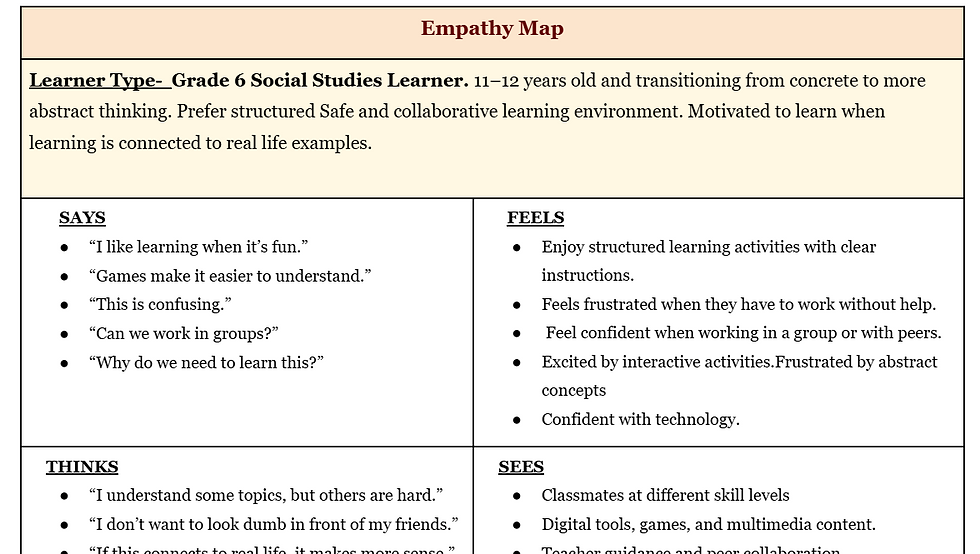
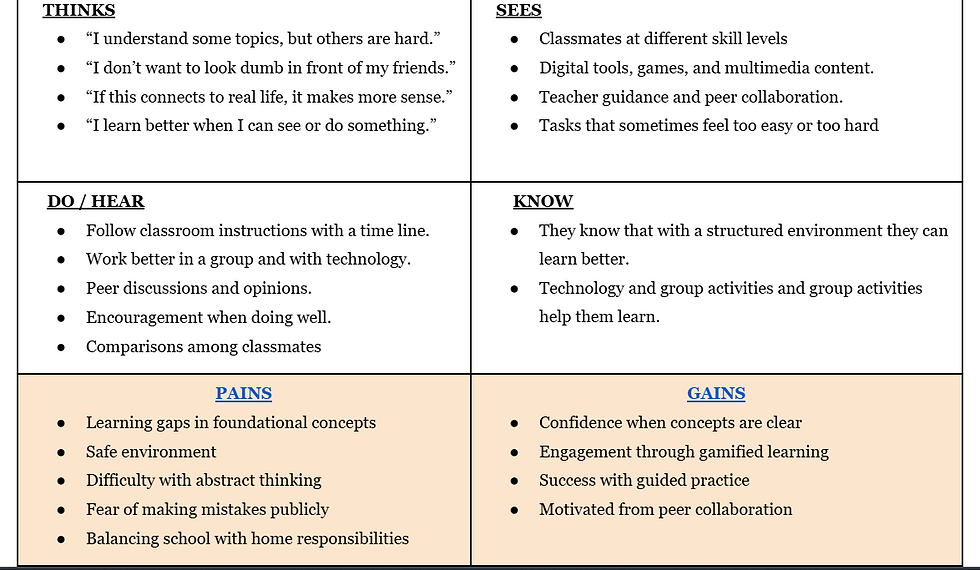
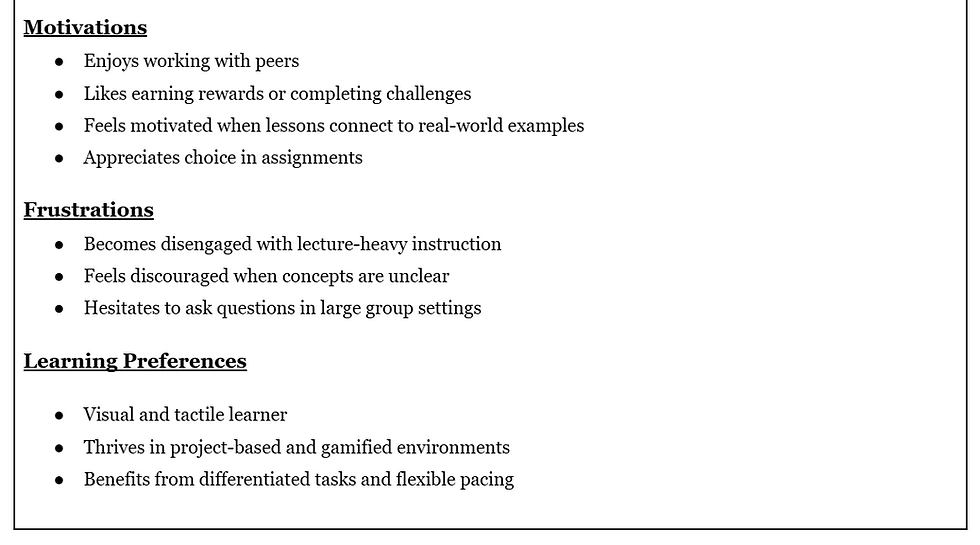
To better understand learner needs, I developed an empathy map and learner personas. These artifacts informed design decisions by identifying learner goals, challenges, motivations, and support needs.
Research Insights & Problem Statement
Research revealed varying levels of prior knowledge, diverse learning needs, and a preference for interactive learning experiences. These findings highlighted the need for scaffolded instruction and flexible assessment opportunities.
My Role & Proposed Solution
As the Instructional Designer, I analyzed learner needs and translated research findings into a Canvas-based learning experience featuring scaffolded pathways, interactive activities, formative assessments, and accessible design.
SME Collaboration & Design Transition
I collaborated with subject matter experts to validate content accuracy, align learning outcomes with curriculum requirements, and refine the instructional approach before moving into the design phase.
Design
Transforming research insights into a learner-centered Canvas experience.
Design Goal
Create a structured, engaging, scaffolded, and accessible learning experience that enables Grade 6 learners to confidently classify and evaluate renewable and non-renewable resources.
Design Decision
Behind every design decision was a deliberate application of instructional design principles, learning theory, and accessibility best practices.
-
Selected Canvas LMS as the primary development platform to leverage existing institutional tools, reducing development time and working within project constraints.
-
Applied pedagogical principles appropriate for middle school learners to create age-appropriate and engaging learning experiences.
-
Used Gagné's Nine Events of Instruction to establish a structured and guided learning sequence.
-
Applied Bloom's Taxonomy to define measurable learning objectives and promote higher-order thinking.
-
Used Backward Design to align learning objectives, instructional activities, and assessments.
-
Designed a structured and guided course flow to support progressive learning and reduce cognitive overload.
-
Included multiple knowledge checks and formative assessments with immediate feedback to reinforce learning and provide opportunities for practice before the final project.
-
Applied Universal Design for Learning (UDL) principles to ensure the course was accessible, inclusive, and supportive of diverse learner needs.
-
Integrated accessibility best practices throughout the course to support usability, inclusivity, and equitable access for all learners.
Instructional Design Artifacts
To ensure the course was instructionally sound, I documented the lesson outline, learning theories, and storyboard before development. These artifacts ensured alignment among learning goals, instructional strategies, assessments, interactions, and course flow, ensuring every design decision supported the desired learning outcomes.


Development
During the development phase, the approved design blueprint was transformed into a fully functional Canvas course. Course content, assessments, multimedia elements, and interactive learning activities were developed and integrated while ensuring alignment with learning objectives, accessibility standards, and instructional design principles.
Course Authoring view

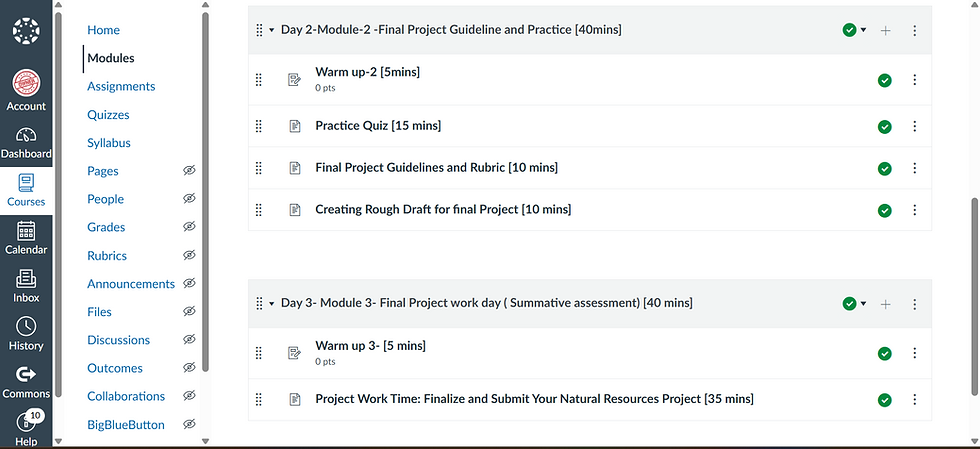


Complete Project Images


Implementation & Data Gathering
Purpose and Planning of Usability Test & Methodology
The purpose of usability testing was to determine whether learners could independently navigate the course, access learning materials and resources, complete activities and assessments, achieve the intended learning objectives, engage with the content, effectively use accessibility features, and successfully complete the final project. The evaluation also aimed to identify potential barriers to learning and opportunities for improvement prior to broader implementation.
Preparing and planning usability test
Prior to usability testing, participants were informed about the purpose, procedures, and expectations of the session. Consent was obtained before testing began. During the session, learners interacted with the e-learning module while a moderator facilitated the process, provided instructions, and ensured a supportive testing environment.
Participants, Setting and Equipments
Participants were selected to represent the target learner group (6th-grade students). Testing was conducted in a middle school classroom environment using appropriate devices and equipment required to access and complete the e-learning module.
Roles in Usability Tests
Roles were assigned to support the usability testing process and data collection. Team members served as facilitators, data recorders, observers, and participants, each contributing to the successful execution of the test and documentation of findings.
Usability Test Metrics
Usability test metrics measured using effectiveness, efficiency, and satisfaction metrics. A combination of behavioral, objective, subjective, and attitudinal data was collected to evaluate learner performance and experience. Effectiveness: Task completion, navigation success, and error rates. Efficiency: Time on task and ease of completing learning activities. Satisfaction: Learner feedback, perceptions, and overall experience. Data collection included performance metrics, observation notes, and learner feedback to capture both objective results and subjective insights.


Reflection on Data Collection
Usability testing provided valuable insights into learner behavior, navigation patterns, engagement, and performance. The data confirmed alignment between learning objectives, instructional activities, assessments, and learner outcomes. The findings also revealed opportunities to improve navigation, accessibility, and learner support before implementation.
Evaluation & Course Revision
Usability testing,data gathering, stakeholder feedback, and learner reviews identified following key opportunities to improve course effectiveness, engagement, and learner success. The revisions below align the course more closely with its learning objectives while enhancing the overall learner experience.
1. Enhance Assessments with Authentic Learning Tasks
To improve assessment quality and alignment with learning objectives, a portion of the Module 2 multiple-choice quiz will be replaced with authentic learning tasks, including short-answer responses, scenario-based activities, and project-based applications. This revision addresses learner feedback regarding lengthy and repetitive assessments while providing opportunities to demonstrate application, analysis, and critical thinking skills. Assessment items will be reviewed against learning objectives, authentic tasks will be integrated throughout the module, and grading rubrics will be updated to ensure clear expectations and meaningful evaluation.
2. Improve Visual Consistency and Navigation
Feedback identified inconsistencies in color usage, page formatting, and page titles, which created navigation challenges for learners. To address these issues, visual design elements will be standardized across the course, with clear and consistent titles and headings added to all content pages. These improvements will create a more cohesive learning experience, enhance navigation and readability, and reduce learner confusion and cognitive load. Implementation will include a visual design review of all modules, application of a consistent color palette and layout structure, addition of clear page titles and headings, and a final usability walkthrough to ensure consistency throughout the course.
3. Provide Clear Technology Requirements and Support
Learner feedback highlighted the need for clearer guidance on required technology skills, tools, and external resources. To address this, a dedicated Technology Requirements & Tips section will be added, providing instructions, tutorials, and support resources. This enhancement will improve learner readiness and confidence, reduce technical barriers, and support successful course completion.
4. Incorporate Rough Draft Feedback Opportunities
Learners expressed a need for formative feedback before submitting their final project. In response, a rough draft submission milestone with structured instructor feedback and a feedback rubric will be introduced. This revision will support mastery-based learning, increase learner confidence, and improve the quality of final project submissions.
Summary
Evaluation findings informed targeted revisions focused on technology support and formative feedback opportunities. These improvements aim to increase learner preparedness, strengthen project development, and create a more supportive, accessible, and effective learning experience.
Conclusion
This project demonstrates how a systematic instructional design process can transform research findings into an engaging, learner-centered Canvas course. Through iterative design, usability testing, stakeholder feedback, and evidence-based revisions, the final product aligns learning objectives, instructional strategies, assessments, and accessibility practices to create an effective digital learning experience.